- PoolParty Semantic Suite Documentation
- PoolParty GraphSearch
- Modifying an Existing Search Space
Modifying an Existing Search Space
02/02/2026
You can modify some of the settings of any existing search space. To do so you need to open the Configuration section on the GraphSearch Admin Dashboard.
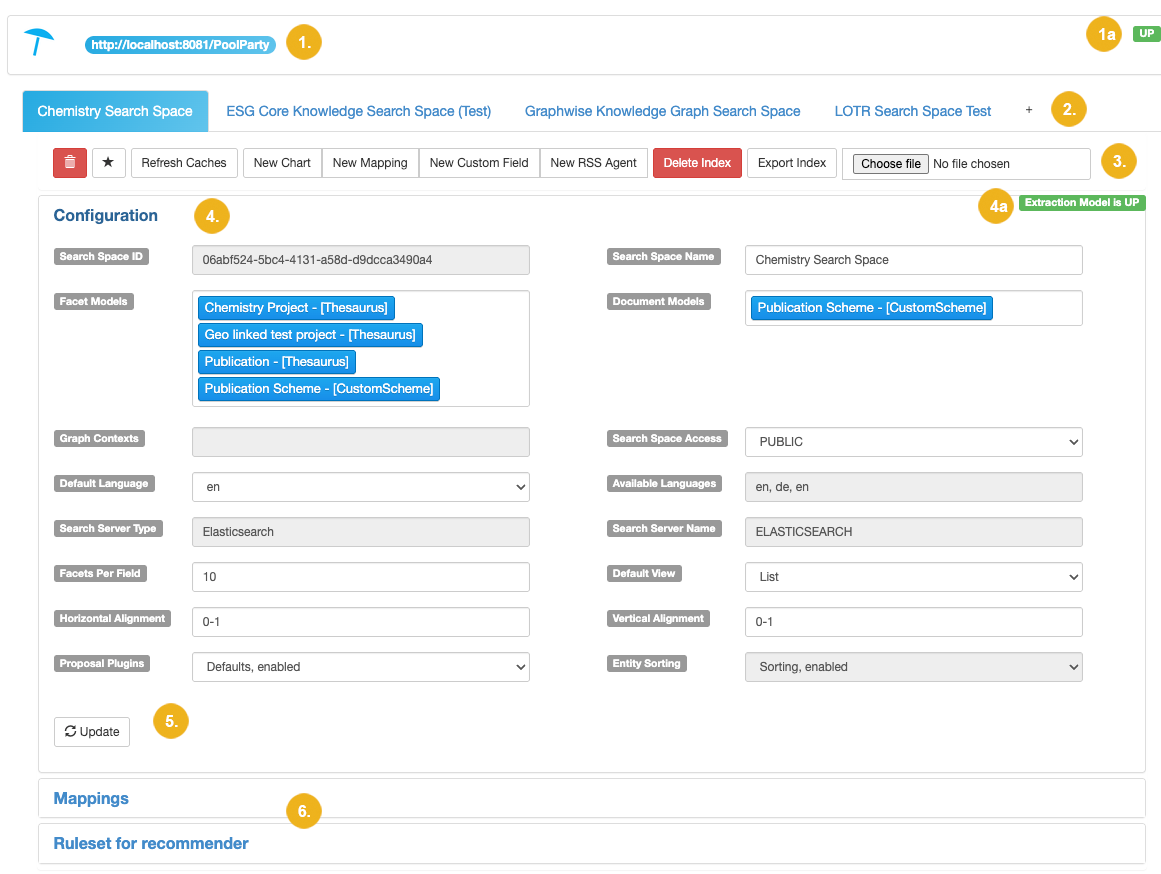
When you click on one of the displayed search spaces and then on Configuration you will see all the configuration details of the selected search space.
Here you can modify the desired settings. Any grayed out settings cannot be edited.
Tip
In the right top corner of this section you see either a green text saying Extraction Model is UP (4a) or red text saying Create Extraction Model. The extraction model is required to be able to perform any search operations.
Details | ||
|---|---|---|
1 | Server details | You see here the PoolParty server instance you are connected to and information whether this connection is active or not. The green icon UP (1a) indicates an active connection. |
2 | Tabs with available search spaces | Each configured search space is represented as an individual tab. If you want to add a new search space click on the + icon located at the end of this list. |
3 | Available menu items | The selected search space has the following operations selectable:
|
4 | The open Configuration section | Here you see all the settings configured for the selected search space; entries with gray background cannot be modified.
|
5 | The Update button | If you made any changes to the modifiable settings, use this button to apply changes. |